

Trusted by over 10,000 businesses





Time & Attendance is more than
time punches.
Time & Attendance is more than time punches.
If you're only tracking start and end times, then you're not getting complete oversight of your workforce. By tracking paid and unpaid breaks, tardiness, availability, PTO, and scheduled time vs actual time variances in one system you can know what your workforce is doing in real time and always pay staff accurately.
Never miss time punches
-
Capture clock in and outs, send automatic reminders for missing time punches based on scheduled hours, and let staff update missing times themselves with self-service. That way you'll stop incomplete timesheets holding up payroll.



Prevent overtime in real-time
-
Send managers and staff alerts when they are about to hit overtime. That way managers can stop overtime during the shift and prevent excess labor costs and staff burnout.
Eliminate time theft
-
Compare punch times to scheduled hours and round to actual time worked, make sure staff are the right location with GPS clocking, and clock in and out for breaks. That way you're only paying staff for the hours they actually worked and prevent future wage theft.




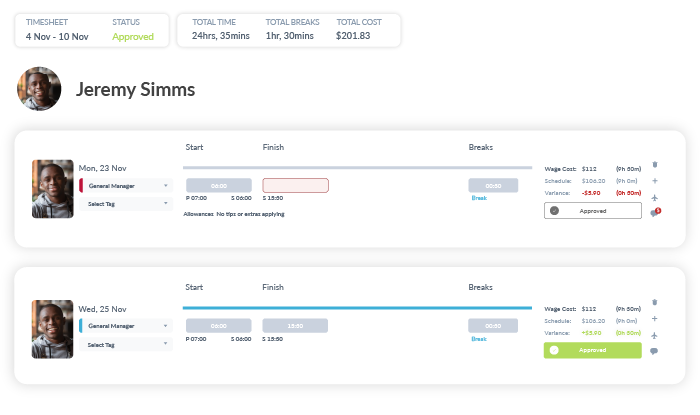
Everything on one timesheet
-
Get complete oversight by tracking paid and unpaid breaks, PTO, split shifts, as well as recording notes on each timesheet. That way you'll have a full paper trail to prevent labor law and compliance lawsuits.
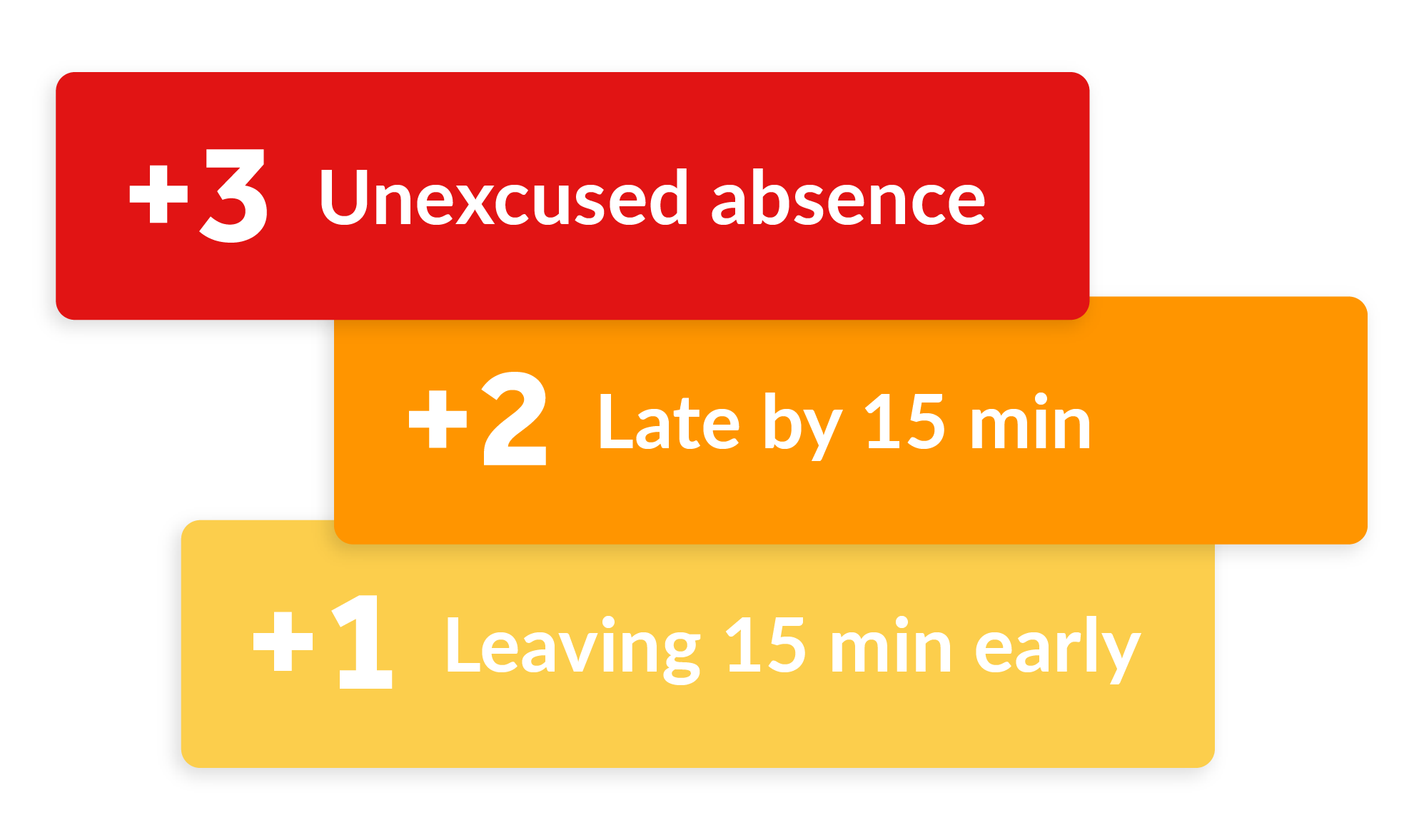
Attendance Points System
-
Customize attendance points based on your attendance policy, and auto-assign based on clocked times compared with scheduled hours. That way you can easily see larger attendance trends and work with managers to reduce call-outs, no shows, and late arrivals.

What's Included
-
Want to learn more about a specific feature?
Get a demo
-
Timeclock
Mobile App & GPS Clocking
Timesheets
Employee Self-Service
-
Attendance Alerts
Auto-Timesheet Approvals
PTO Management & Policies
Break Management & Compliance

Frequently Asked Questions
How much does Workforce.com cost?
To find out what will work best for your business needs, visit our pricing page to request a quote.
Do I have to buy a physical time clock?
Workforce.com is entirely web-based, meaning staff can clock in and out of work on any device. You may download our kiosk app to use on a centralized tablet, or employees can download the Workforce.com app to their IOS or Android device to clock in right from their phone.
How does time and attendance staffing and scheduling prevent overtime?
Time and attendance software helps prevent overtime in two main ways: real-time alerts and smarter scheduling.
First, managers get alerts when an employee is close to hitting overtime but hasn't clocked out yet. This gives them a chance to step in before overtime kicks in. Employees can also receive reminders if they forget to clock out at the end of a shift, helping prevent accidental overtime.
Overtime prevention also starts during scheduling. By using demand forecasts, managers can schedule the correct number of employees for each shift based on expected workload. This reduces overstaffing (which leads to unnecessary labor costs) and understaffing (which often forces employees to stay late).
Can time and attendance staffing and scheduling reduce time theft?
Yes. Time and attendance software is designed to close common loopholes that lead to time theft.
Selfie clock-in and GPS tracking features prevent buddy punching and ensure employees clock in on time, clock out on time, and don't work outside their scheduled hours without approval. Built-in guardrails also flag unnecessary overtime so managers can review and correct issues before they impact payroll.
Together, these controls make sure employees are paid for the time they actually work.
How does time and attendance staffing and scheduling improve payroll accuracy?
Time and attendance and scheduling systems improve payroll accuracy by ensuring time data is accurate from the start.
The system links scheduled shifts with actual clock-in and clock-out times, making discrepancies easy to catch. It also accounts for things like PTO and last-minute call-outs. Because everything is tracked and approved before payroll runs, there's less manual correction and a much lower risk of overpaying or underpaying employees.
Can I use Workforce.com’s attendance solution to schedule my staff?
While Workforce.com’s attendance module only focuses on recording work hours, you can use Workforce.com’s shift scheduling platform to quickly build, fill out, and deploy schedules to your staff. Syncing Workforce.com’s employee scheduling tool with time & attendance gives you insight into real-time data - namely, wage & hour variances, attendance notifications, and employee productivity metrics. Syncing the two systems also helps you enforce overtime rules and avoid shift clashes.
Can I manage multiple locations in Workforce.com?
Yes, very easily! You have the ability to set up as many teams and locations as you need on Workforce.com. With a live time clock feed, you can see who is clocking in and out at every location. At the end of the pay period, you can view timecards per location or all your timesheets simultaneously and filter by location.
Does Workforce.com send alerts for missing time punches?
Yes. Workforce.com notifies managers when an employee misses a clock-in or clock-out. Employees also receive reminders if they haven't clocked in or clocked out for their scheduled shift, helping catch missed punches early.
Is Workforce.com easy to use?
Yes! We designed our software to streamline shift work for hourly employees; this means our software is accessible, intuitive, and highly user-friendly.
Does Workforce.com's time tracking software pay my staff?
No, the time & attendance module is simply for tracking employee hours and generating timesheets. In order to pay your staff, you'll need to export timesheets to either Workforce.com's payroll software or to an integrated third-party payroll provider.
What compliance features does Workforce.com include for timesheets?
Workforce.com includes built-in compliance guardrails that help catch issues before timesheets are sent to payroll. The system flags common discrepancies, such as missing clock-ins or clock-outs, unrecorded meal or rest breaks, and partially completed time entries. Managers can review these issues, make corrections where needed, and approve timesheets with confidence. This review process helps reduce payroll errors and supports more consistent, compliant timekeeping.
Can I export timesheets to a spreadsheet instead of running them directly through payroll?
Absolutely! You can run a CSV or SFTP export for all your timesheets if you have an external payroll system. While this method does work, it does add more time to your overall payroll process – that’s why it's best practice to seamlessly push all approved timesheets to Workforce.com's payroll system for a faster pay run.
How do I record an employee’s clock-in and clock-out location?
Workforce.com's mobile app uses GPS tracking, meaning it captures the exact location of an employee each time they clock in and clock out. It does not track an employee's location throughout a shift; rather, it only records in-the-moment GPS data with every punch of the time clock.
How does time and attendance software prevent time theft?
Several ways. Geofencing functionality lets you define clock-in areas to ensure employees begin shifts in their designated workplaces. Photo identification and optional biometric face scanning confirm the identity of the person clocking in as well, eliminating buddy punching.
What size businesses typically use Workforce.com’s time and attendance system?
While small businesses and large enterprises use Workforce.com, our platform best suits shift-based organizations with 20-3,000 staff, primarily in retail, hospitality, and healthcare. Organizations with a large number of employees typically use Workforce.com's all-in-one HCM package, as it gives managers more control over and deeper insight into their workforce management operations.
Where can I find more information about hourly employee time and attendance?
Glad you asked! Check out our blog for the latest on timekeeping tips and trends, watch one of our webinars, or read one of our client stories.
I’m a remote contractor. Can I use Workforce.com to invoice billable time?
No. Workforce.com is primarily used by shift-based organizations to track time for on-site staff. As such, it's not the most practical tool for remote employees, freelance professionals, or contract workers.