
Your HR & workforce management in one platform
Get rid of your operational headaches by bringing your HR and your workforce management processes under one roof.

Trusted by businesses great and small










Hire, onboard, & train staff
Hire exceptional staff and start them off on the right note.
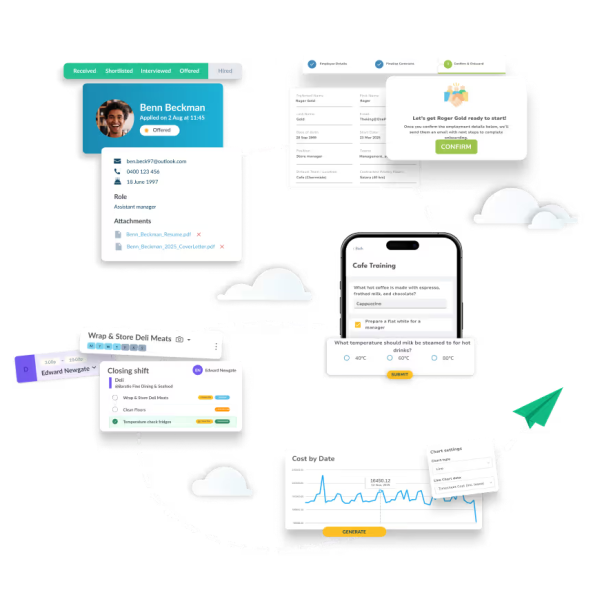
Speed up your recruitment process. Workforce Hire is our applicant tracking system (ATS) that helps you find talent and grow your team faster. Post job ads that meet Canadian legislative requirements, add screening questions, collect resumes, and progress successful applicants straight into your workforce.
Collect all the information that informs payroll. Collect all the information that informs payroll. Workforce's Employee Onboarding software automates the process of collecting employee details. Simply send new hires an invitation and Workforce.com collects their TD1 tax form, SIN, bank details, and more. It's not just time you save - it means you never lose key information.
Reach full productivity quickly. Our Training feature makes inductions and upskilling a breeze. Design a comprehensive training module that can be actioned through the Workforce mobile app, complete with instructional videos, questions to test understanding, and manager sign-offs. Have confidence your team's on the same page.
Get staff on the schedule quicker. With a single system to handle to your hiring, onboarding, and training, you'll get back valuable time getting your new staff up to speed.

Cultivate talent & maintain standards
Communicate expectations clearly and get the most out of your team.
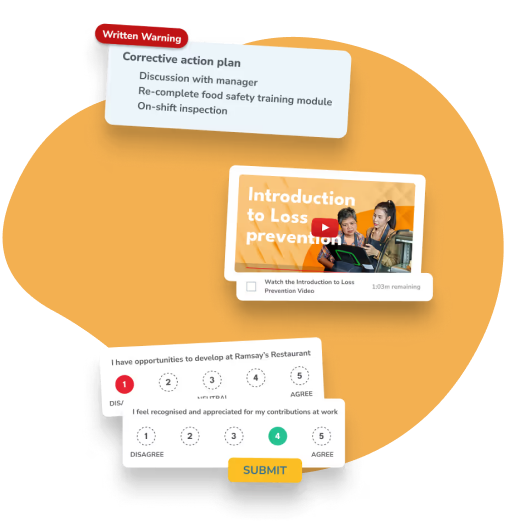
Empower your team to improve. Performance Management tools can help boost company morale and mitigate employee attrition. Whether it's a probationary review or an annual assessment, you can complete and store reviews to advise career progression.
Keep a record of disciplinary action. When staff behaviour requires a written warning, use Workforce.com HR to keep the facts straight. Include all the key details of the incident like dates and times, provide corrective action, and get your team back to doing what they do best. Have staff acknowledge any warnings they've been issued and be confident you've followed due process.
Make informed rostering decisions. Get insight into your frontline and use staff feedback to adjust operations and strengthen your core team. Whether you're adjusting shift times to mitigate lateness, or running extra training sessions based on engagement surveys, give staff the tools they need to succeed.
Records at the ready. Performance reviews and written warnings are easy to find in Workforce, even for staff who have left the business. Extensive reporting means you'll always have access to the important information, getting the facts straight.
Contracts and policies, all in one place
Store and manage your own employment contracts and policies in Workforce.com. Collect employee signatures and keep everything in one place.
Send, acknowledge, and store contracts. Forget sorting through paper documents. Centralise your contracts and policies and have staff acknowledge forms with a digital signature through the Workforce.com mobile app. You'll always have easy access to the documents you store in Workforce.com.
Contracts pre-written by employment lawyers. Tanda's suite of HR Legal Templates have been prepared with real-world scenarios in mind. Employment lawyers at Australian firm Kingston Reid curate and maintain contract and policy templates in line with Fair Work requirements.
Access employment law resources. With Tanda HR, you'll gain complimentary access to the Employment Law Handbook, Australia's most comprehensive, easy-to-understand guide to employment law.
Share policies and documents. Keep all your document management in one place. Send staff company policies, new menus and other documents to access and acknowledge through the Tanda mobile app.

Optimise your business operations
Use our Operations tools to manage your most important daily processes and maintain operational compliance.
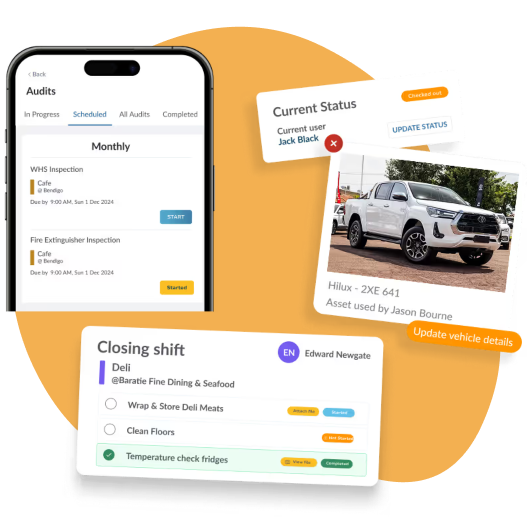
Streamline your daily tasks. Create and complete Checklists to ensure procedures are being followed each shift. From store opens to food safety checks, report on which tasks are being actioned and collect temperatures, measurements, or anything else that helps maintain compliance.
Keep an eye on your assets. Store records for equipment in the workplace with Asset Management. Staff can check out and return equipment through the Tanda mobile app, view any scheduled maintenance, or report issues. Have confidence knowing where your assets are and the condition they're in.
Improve workplace safety and regulatory compliance. With our Audits feature, you can capture your most complicated workflows and compliance checks through the Tanda mobile app. Schedule fire safety audits, take inventory of first aid supplies, and more in a series of in-depth questions.
Maintain standards remotely. Use Operation's reporting features to check remote progress from your stores. Even when you're not on the floor, you can watch the full picture unfold.
Consolidate systems with Workforce.com
Get rid of multiple systems and manage HR, scheduling, and payroll in one place.




“Workforce.com gives me a direct connection to the field – this transparency helps our retention and employee experience, ultimately creating more loyalty”

Frequently Asked Questions
Can time and attendance staffing and scheduling reduce time theft?
Yes. Time theft is one of the most common hidden costs for businesses with hourly employees, and Workforce.com is built to close the loopholes that allow it to happen.
Selfie clock-ins and unique passcodes make buddy punching virtually impossible - only the right person can clock in for their own shift. GPS tracking and geofencing verify that employees are physically at their designated worksite when they punch in, which is particularly useful for businesses with staff working across multiple locations or out in the field.
Break tracking ensures employees clock out and back in for breaks, preventing unauthorised extended breaks from going unnoticed. And because scheduled hours are compared against actual punch times in real time, managers can spot and address discrepancies before they reach payroll.
Together, these controls mean you are only paying for the hours your employees actually worked.
Do I have to buy a physical time clock?
No. Workforce.com is entirely web-based, so there is no hardware to purchase.
Employees can clock in and out in two ways. The first is through the Workforce.com mobile app on their own iOS or Android device - using selfie verification and GPS to confirm their identity and location. The second is through a kiosk app, which you can download onto any existing tablet and set up on-site as a shared clock-in point. Staff use unique PIN codes and photo identification to clock in and out securely.
Both options give you the same accurate, verified time data - without the cost or maintenance of dedicated hardware.
Does Workforce.com send alerts for missing time punches?
Yes. Workforce.com automatically notifies managers when an employee misses a clock-in or clock-out for their scheduled shift. Employees also receive reminders on the mobile app if they forget to punch in or out, helping catch missing time entries before they cause payroll errors.
You can configure alerts by role - so managers, admins, or employees receive the right notifications for their level. A configurable grace period means alerts only trigger after a set window of time, reducing noise from minor late arrivals.
Employees can also correct their own missing punches through the self-service mobile app, with changes sent to their manager for approval - keeping timesheets accurate without the back-and-forth.
How does time and attendance staffing and scheduling improve payroll accuracy?
Payroll errors almost always start before payroll runs - they come from inaccurate or incomplete time data. Workforce.com addresses this by ensuring time data is clean and verified long before a pay run begins.
Scheduled shifts are linked directly to actual clock-in and clock-out times, so any discrepancy is immediately visible. Timesheets that match scheduled hours can be auto-approved, while those with variances are flagged for manager review - meaning issues get caught and corrected early, not discovered after employees have already been paid.
The system also automatically accounts for overtime, breaks, PTO, and different pay rates across roles - all calculated without manual input. Because scheduling, time tracking, and payroll all live in the same platform, there is no manual data export or re-entry between systems, which removes one of the most common sources of payroll error.
For Canadian employers, this is particularly valuable. With overtime rules and pay requirements varying by province, having a system that automatically applies the correct rates based on where and when your employees work means you can process payroll with confidence.
Consolidate systems with Workforce.com
Get rid of multiple systems and manage HR, scheduling, and payroll in one place.